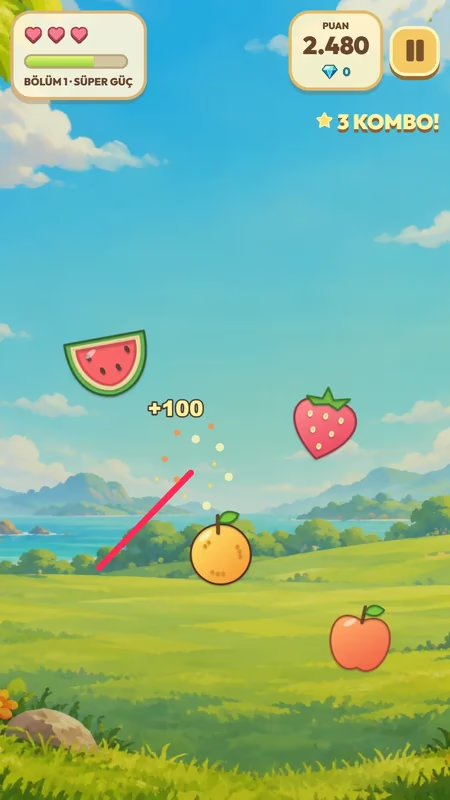
Index finger: slice
Move your index finger through the air to guide a slicing trail across the objects.
READY, SHOW YOUR HAND!
Start by tapping buttons in the menus. During gameplay, your Android phone's front camera tracks your hand; move your index finger through the air to slice the flying objects. First set up a comfortable play space, then follow the opening tutorial.
Get ready for my first gameTap buttons in the menus. Slice fruit in the air with your hand.
STEP BY STEP
Hold your phone in one hand or place it somewhere stable where it won't fall. Keep the front camera clear so it can see your entire playing hand. Choose an evenly lit spot where your hand isn't in shadow.
Tap the buttons in the app's menu to start the game. Camera permission is needed for hand tracking. If it is off, check the Android app settings; this website does not request camera access.
Show your entire hand to the front camera. Check the hand landmarks in the small tracking window on screen. If your fingers leave the picture, adjust the phone angle or your distance from it.
Move your index finger from side to side in the air. Guide the on-screen slicing trail across the flying objects. Start with short, comfortable movements and avoid slicing bombs.
The opening tutorial introduces five gestures one at a time. Try the V sign, three fingers, a fist and an open hand in turn. After using a power, release the gesture and watch for the status showing that it's ready again.
In normal rounds, build a combo streak with successive successful slices and collect diamonds. Check current shop prices to unlock new worlds and upgrades. A newly unlocked world becomes active; you can also select previously unlocked worlds in the shop.
FIVE GESTURES, ONE ADVENTURE
Get comfortable slicing first. Then try these gestures one by one in the tutorial.
Move your index finger through the air to guide a slicing trail across the objects.
Hold up two fingers. Lightning Slice collects safe objects on screen; there must be objects available to collect.
Hold up your index, middle and ring fingers. Time Bubble temporarily slows objects down.
Close your hand. Safe objects gather toward the center of the screen, while bombs are pushed away.
When your power bar is full, show all five fingers to the camera. Cooldowns and the need to release the gesture also apply here.
Release your gesture after using a power. Try again when the on-screen indicator is ready.
SMALL ADJUSTMENTS, COMFORTABLE PLAY
Keep your hand well lit. Place bright lights or windows in front of you or to the side, rather than behind you.
If your finger and hand appear in the small hand window, you're ready. Find a comfortable distance instead of playing too close.
You don't need to swing your whole arm. In your first round, get used to the slicing trail with small, controlled movements.
STUCK ON SOMETHING?
Common questions about hand gestures and the camera.
Write to usYou tap buttons for menu actions such as choosing a world and starting the game. During gameplay, move your index finger through the air in front of the front camera to slice objects.
There is no single distance that suits every phone and hand position. Find a position where your entire hand is visible to the camera and you can comfortably control the slicing trail. Use the hand tracking window to adjust the distance and angle.
No. Camera footage and hand landmarks are processed on your phone; no photos or videos are recorded and footage is not sent over the internet. The privacy policy explains technical data relating to advertising services.
The app needs access to the front camera for gesture controls. You can check the permission in the Android app settings. No camera permission is needed to browse this promotional website or read the guides.
Powers share a cooldown. After using one, release your gesture and wait for it to be ready again. Super Power also requires a full energy bar.
In a normal round, slicing a bomb costs a life and resets your combo streak. Missing normal gameplay objects can also cost a life and end the streak. There is no penalty for missed objects in the opening tutorial.
Choosing a world in the shop changes the background and the look of the objects. Difficulty levels are separate from your world choice, and the pace changes as the round progresses.
The tutorial teaches the gestures; its reward effects are not added to your diamond wallet. In normal rounds, you earn diamonds by collecting objects and reaching certain combo milestones.
Your diamond balance, unlocked worlds and upgrades are stored on your device. Do not assume this local save will transfer automatically through a cloud account. Keep this in mind before clearing app data or changing devices.
Use the contact page to tell us your phone model, Android version and the step where the problem occurs. You don't need to send camera footage or private information.
THE NEXT STEP
Getting started
From positioning your phone to your first slice: set up a play space that tracks your hand comfortably and get used to camera controls.
Read the article: Camera-controlled fruit slicing: get ready for your first gameGame tips
What do the combo counter, lives and power bar mean? Learn when to use Lightning Slice, Time Bubble and the other gestures.
Read the article: Combos and special powers: beginner tips for Ninja King AdventuresWorld guide
Meet the objects in six worlds, choose a diamond-saving goal and learn the difference between shop upgrades and gesture powers.
Read the article: Worlds and diamonds: choose your own Ninja King adventureSHOW YOUR HAND, JOIN THE ADVENTURE
Discover Ninja King Adventures on Google Play. Try the gestures in the opening tutorial.
Get it on Google Play